Choose Your Template
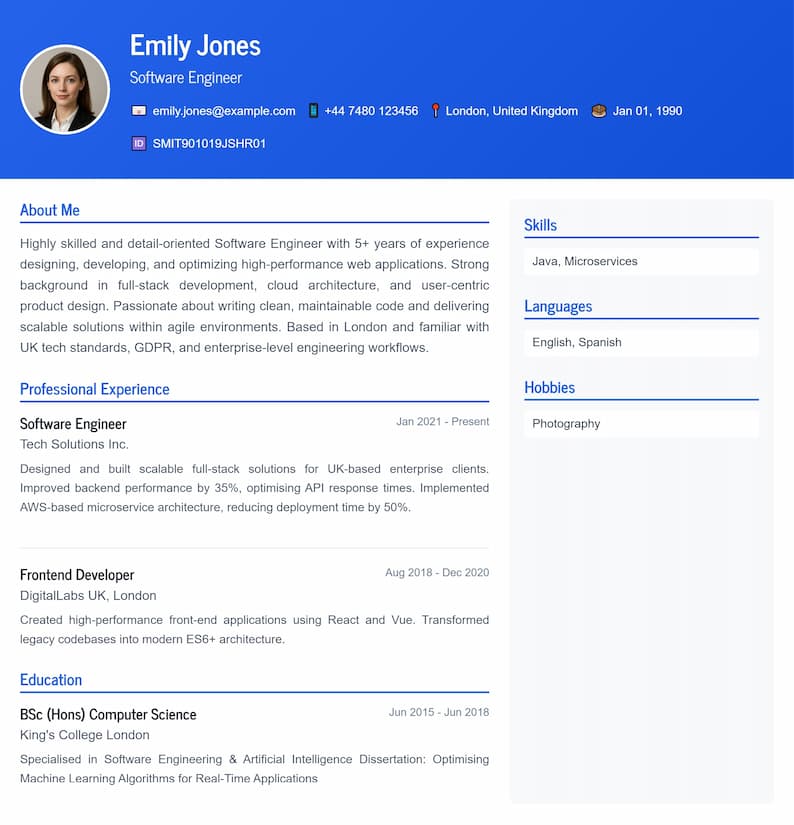
Modern Professional
Clean and contemporary design
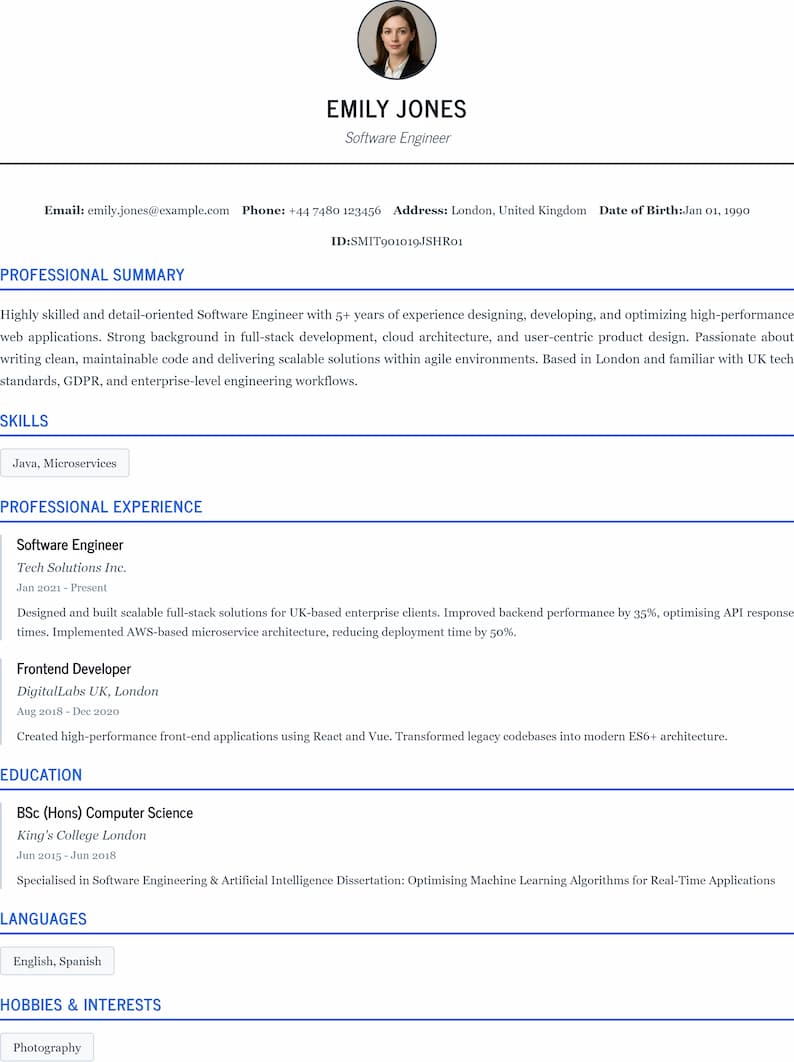
Classic Elegant
Traditional and professional
Personal Information
Skills, Languages & Hobbies
Skills
Languages
Hobbies
Professional Experience
Experience #1
Educational Background
Education #1
Final Preview & Export
✨ Customize Appearance
📄 PDF Export Settings
Page Margins (mm)
Live Preview
👈 Select a template to start
CV Maker by Rojgar Tools: Create Professional Resumes in Minutes
Looking for a quick and easy way to build a professional CV that stands out? The CV Maker tool by Rojgar Tools helps you create stunning, job-ready resumes without any design experience. Whether you're a fresh graduate, career changer, or seasoned professional, this free online CV builder guides you through every step of the process—from selecting templates to downloading a polished PDF.
What is the CV Maker Tool?
The CV Maker is a step-by-step resume builder designed to help job seekers create professional CVs with ease. Unlike complicated design software or expensive resume services, this tool simplifies the entire process into six straightforward steps. You fill in your information, watch your CV update in real-time, and download a perfectly formatted document ready for job applications.
How the CV Maker Works
The CV Maker follows a logical, user-friendly workflow that anyone can navigate. Here's the basic process:
Step 1: Choose Your Template – Browse through professionally designed CV templates and select the one that matches your style and industry.
Step 2: Add Personal Information – Enter your basic details including name, job title, contact information, and a brief introduction about yourself.
Step 3: List Your Skills – Add relevant skills, languages you speak, and personal hobbies that showcase your personality.
Step 4: Detail Your Experience – Document your work history with positions held, companies, job roles, and employment dates.
Step 5: Include Education – Fill in your academic background with degrees, institutions, and dates of study.
Step 6: Preview and Customize – Fine-tune your CV's appearance, adjust colors and fonts, configure PDF export settings, and download your finished resume.
The beauty of this tool lies in its live preview feature—as you type information into any field, your CV updates instantly on the screen. You see exactly what employers will see before you download anything.
Main Features of the CV Maker
Real-Time Preview: Watch your CV come to life as you fill in each section. No surprises when you download—what you see is what you get.
Multiple Professional Templates: Choose from various layout styles that suit different industries and career levels, from creative fields to corporate positions.
Comprehensive Sections: The tool covers all essential CV components—personal details, skills, languages, hobbies, work experience, education, and personal statements.
Flexible Customization: Change template designs mid-process, adjust primary colors, select different font families and sizes to match your personal brand.
Advanced PDF Export Options: Control every aspect of your final document with customizable page sizes (A3, A4, Legal, Letter), orientation choices (portrait or landscape), quality settings, fit modes, and precise margin adjustments.
No Limitations on Entries: Add as many skills, languages, hobbies, work experiences, or educational qualifications as needed. The tool expands to accommodate your complete career history.
Profile Photo Integration: Upload a professional headshot directly into your CV for positions where visual presentation matters.
Optional Government ID Field: For applications requiring identification numbers, this optional field provides extra flexibility.
Where CV Maker Fits Within Rojgar Tools
Rojgar Tools is a comprehensive platform dedicated to helping job seekers succeed in their employment journey. The CV Maker sits at the heart of this mission as one of the most essential tools for anyone entering the job market or seeking career advancement.
Within the Rojgar Tools ecosystem, the CV Maker complements other employment-focused utilities by providing the foundational document every job application requires—a professional resume. While other tools on the platform may help with job searches, interview preparation, or skill assessments, the CV Maker ensures you have a polished, professional document to present to potential employers from day one.
Benefits and Real-World Use Cases
Why You Should Use the CV Maker Tool
Creating a professional CV from scratch can be intimidating and time-consuming. Many people struggle with formatting, design choices, and presenting their experience in the best light. The CV Maker removes these barriers completely.
Save Time and Effort: Instead of spending hours wrestling with word processors or expensive design software, you can create a complete professional CV in 15-20 minutes.
Professional Results Guaranteed: The pre-designed templates follow industry standards and best practices, ensuring your CV looks polished and credible.
No Technical Skills Required: You don't need to be a designer or tech expert. If you can fill out a form, you can create a professional CV.
Completely Free: Unlike paid resume services that charge subscription fees or per-download costs, Rojgar Tools' CV Maker is entirely free to use with unlimited downloads.
Always Accessible: As a web-based tool, you can access it from any device with an internet connection—your laptop at home, your phone on the go, or a computer at the library.
Privacy-Focused: Your personal information isn't stored on our servers. Create your CV, download it, and move forward with confidence in your data security.
How the CV Maker Solves Common Problems
Problem 1: "I don't know how to format a CV properly." Solution: The CV Maker's templates follow proven formats that recruiters and hiring managers expect. You simply fill in your information, and the tool handles all formatting automatically.
Problem 2: "My CV looks unprofessional and cluttered." Solution: Professional designers created these templates with clean layouts, appropriate spacing, and visual hierarchy that makes your information easy to scan.
Problem 3: "I'm not sure what to include or how to phrase my experience." Solution: The structured step-by-step approach guides you through each essential section, ensuring you don't miss important elements that employers look for.
Problem 4: "Hiring a professional CV writer is too expensive." Solution: With Rojgar Tools' free CV Maker, you get professional-quality results without paying hundreds of dollars to resume writing services.
Problem 5: "I need to update my CV frequently for different applications." Solution: You can quickly create multiple versions of your CV by selecting different templates, emphasizing different skills, or tailoring your experience for specific roles.
Real-World Examples
Fresh Graduate: Priya just completed her engineering degree and needs her first professional CV. She has limited work experience but plenty of academic projects and skills. Using the CV Maker, she selects a template that emphasizes education and skills, adds her internship experience, lists her technical competencies, and creates a clean, professional CV in under 20 minutes. Within a week of applying with her new CV, she lands three interview calls.
Career Changer: Rajesh worked in retail management for five years but wants to transition into digital marketing. He uses the CV Maker to restructure his experience, highlighting transferable skills like team leadership, customer analysis, and sales strategy. By selecting a modern template and emphasizing his newly acquired digital marketing certifications in the education section, he creates a CV that positions him as a viable candidate for his target industry.
Experienced Professional: Katty is a senior accountant with 12 years of experience across multiple companies. She needs to update her CV for a CFO position. The CV Maker allows her to add all her work experiences, showcase her CPA and MBA credentials prominently in the education section, and list specialized skills like financial forecasting and regulatory compliance. She customizes the color scheme to match her professional brand and exports a polished PDF that reflects her executive-level expertise.
Freelancer: Mark works as a freelance graphic designer and needs a CV to apply for project-based contracts. He adds his profile photo to showcase his creative personality, lists multiple short-term projects in the experience section, and includes languages he speaks to appeal to international clients. The flexibility to add numerous entries means his diverse portfolio fits naturally into one comprehensive document.
Step-by-Step Guide: How to Use the CV Maker Tool
Step 1: Select Your CV Template
When you first open the CV Maker tool on Rojgar Tools, you'll see a collection of professionally designed templates.
What to do: Browse through the available options and click on the template that best matches your industry and personal style. Consider whether you want a traditional, conservative look or something more modern and creative.
Tips for best results: Choose a template appropriate for your target industry. Creative fields like marketing or design might suit colorful, modern layouts, while corporate positions in finance or law typically require more conservative, traditional formats. If you're unsure, classic templates work well for almost any field.
Step 2: Fill in Personal Information
This section captures your basic contact details and introduction.
What to fill in:
- Profile Photo: Upload a professional headshot (optional but recommended for many positions)
- First Name: Your given name
- Last Name: Your surname or family name
- Job Title: Your current role or the position you're targeting
- Address: Your full address or city/state if you prefer not to share complete details
- Email: A professional email address
- Mobile Number: Your contact phone number with country code
- Date of Birth: Your birth date (optional in some countries due to discrimination laws)
- Government ID: Any official ID number if required (optional)
- Short Introduction: A brief 2-4 sentence paragraph about your professional background, key strengths, and career goals
Tips for best results: Use a professional email address (avoid casual handles like "partygirl123@email.com"). Your short introduction should be concise and impactful—think of it as your elevator pitch. For the profile photo, ensure it's a clear, recent image with professional attire and a neutral background. As you fill each field, watch the live preview update to see how your information looks in the chosen template.
Step 3: Add Skills, Languages, and Hobbies
This section showcases your capabilities beyond formal work and education.
What to fill in:
- Skills: List professional competencies relevant to your target position (e.g., "Project Management," "Python Programming," "Customer Service")
- Languages: Include all languages you speak with proficiency levels if the template supports it (e.g., "English - Fluent," "Hindi - Native," "Spanish - Conversational")
- Hobbies: Add 3-5 personal interests that reflect well on your character (e.g., "Volunteering," "Reading," "Marathon Running")
How to add multiple entries: You'll see a "+" button next to each category. Click it to add additional skills, languages, or hobbies. There's no limit—add as many as relevant.
Tips for best results: Focus on skills that match the job description you're targeting. Avoid generic phrases like "hard worker" or "team player" and instead list specific, measurable skills. For languages, be honest about proficiency—you may be tested during an interview. Choose hobbies that demonstrate positive qualities (leadership, creativity, physical fitness, continuous learning) rather than passive activities. Don't overcrowd this section; 5-8 skills, 2-4 languages, and 3-5 hobbies are usually sufficient.
Step 4: Detail Your Work Experience
This critical section documents your professional history.
What to fill in for each position:
- Start Date: When you began this role (month and year)
- End Date: When you left this role, or select "Present" if you're currently employed there
- Position Held: Your official job title
- Company: The organization's name
- Job Role/Description: A brief description of your responsibilities and achievements (3-5 bullet points work well)
How to add multiple experiences: Click the "+" button to add another work experience entry. Add all relevant positions, working backward from your most recent role.
Tips for best results: List experiences in reverse chronological order (most recent first). For each role, focus on achievements rather than just duties—use numbers and metrics where possible (e.g., "Increased sales by 35%" instead of "Responsible for sales"). Use action verbs to start each bullet point: "Managed," "Developed," "Implemented," "Led," "Achieved." If you have many years of experience, you can summarize older roles more briefly and emphasize recent positions. For career gaps, consider adding relevant activities like freelance work, volunteering, or professional development courses.
Step 5: Include Your Educational Background
Document your academic qualifications and professional certifications.
What to fill in for each qualification:
- Start Date: When you began this program
- End Date: When you completed it (or expected graduation date)
- Degree/Qualification: The specific degree, diploma, or certification earned (e.g., "Bachelor of Science in Computer Science," "Certified Public Accountant")
- Institution: The school, university, or certification body
- Additional Details: GPA, honors, relevant coursework, or special achievements (if the template provides space)
How to add multiple qualifications: Use the "+" button to add additional degrees, diplomas, or certifications.
Tips for best results: List education in reverse chronological order. If you're a recent graduate, your education section should be prominent. If you have extensive work experience, it's fine to keep this section brief. Include relevant certifications, professional training, and online courses that strengthen your candidacy. Only include high school education if you're a recent graduate or if you haven't completed higher education. Mention academic honors like "Dean's List" or "Summa Cum Laude" if applicable.
Step 6: Preview, Customize, and Download
The final step lets you perfect your CV's appearance and export it.
Customization Options:
- Change Template: Not satisfied with your initial choice? Switch to a different template and watch your content automatically reformat
- Primary Color: Adjust the accent color used in your CV to match your personal brand or industry norms
- Font Family: Select from various professional typefaces that affect readability and style
- Font Size: Adjust text size for optimal readability and to help your CV fit on one or two pages
PDF Export Settings:
Page Size: Choose the standard for your region:
- A4: International standard (most countries)
- Letter: US and Canada standard
- A3: Larger format for portfolio-style CVs
- Legal: Used for lengthy documents
Orientation:
- Portrait: Standard vertical layout (recommended for most CVs)
- Landscape: Horizontal layout for creative or infographic-style CVs
Quality (Scale):
- Low: Faster download, smaller file size, lower image quality
- Fast: Balanced option for quick processing
- Medium: Good quality for most applications
- Ultra: Highest quality for printing or when image clarity is critical
Fit Mode: Control how your CV content adapts to the page:
- Fit to Width: Scales content to page width
- Fit to Height: Scales to page height
- Fit to Page (Best Fit): Automatically optimizes for best appearance (recommended)
- Actual Size: No scaling applied
- Stretch (Fill Page): Expands to fill entire page
Page Margins: Fine-tune spacing from the top, bottom, left, and right edges (measured in millimeters) to control white space and fit more or less content
Final Step: Once all settings are configured, click the "Download PDF" button. Your professional CV will download to your device as a high-quality PDF file ready to attach to job applications.
Tips for best results: Preview your CV carefully before downloading. Check for typos, formatting issues, and ensure all information displays correctly. For most professional applications, stick with A4 or Letter size in portrait orientation with medium to ultra quality. Adjust margins if your content barely spills onto a second page—sometimes reducing margins by 2-3mm on each side can bring everything onto one page. Save multiple versions with different customizations for different types of applications.
Why Rojgar Tools' CV Maker is Better Than Alternatives
Comparison with Other CV Builder Tools and Websites
The internet offers dozens of CV and resume builder tools, so what makes Rojgar Tools' CV Maker stand out?
No Photo Storage or Data Retention: Unlike many online CV builders that store your personal information on their servers (creating privacy risks and potential data breaches), Rojgar Tools' CV Maker doesn't retain your data. You create your CV, download it, and that's it. Your sensitive personal information, contact details, and work history never sit on external servers waiting to be compromised.
Completely Free with No Hidden Costs: Most competing CV builder websites use a "freemium" model—you can create a CV for free, but you must pay to download it, remove watermarks, or access decent templates. Others charge monthly subscription fees. Rojgar Tools' CV Maker is 100% free with no premium tiers, no watermarks on your downloaded CV, and no surprise charges when you click download.
No Account Creation Required: Many CV builders force you to create an account, verify your email, and log in before you can use basic features. This adds unnecessary friction and means another password to remember (or forget). The CV Maker lets you start building immediately without any registration barriers.
Fast, Lightweight, and Responsive: The tool is built for speed. Pages load quickly, the live preview updates instantly, and the interface responds smoothly even on slower internet connections or older devices. Competing tools often load slowly due to bloated code, excessive advertising, or resource-intensive features you don't need.
Secure and Private: Your connection to Rojgar Tools uses secure protocols, and since your data isn't stored, there's no database to hack. Compare this to platforms that have experienced data breaches exposing thousands of users' personal information to cybercriminals.
User-Centric Design: Every aspect of the CV Maker was designed with the user experience in mind. The six-step process is intuitive and logical, matching the way people naturally think about their career history. Competing tools often present overwhelming forms or confusing navigation that makes the process frustrating rather than empowering.
No Advertisements or Distractions: When you're creating something as important as your CV, you need to focus. Rojgar Tools' clean interface keeps you in the flow without pop-ups, banner ads, or video commercials interrupting your work. Many free competitors clutter their interfaces with intrusive advertising that makes the experience unpleasant.
Unlimited Edits and Downloads: Create as many versions as you need. Download your CV today, make changes tomorrow, and download again—as many times as you want. Some competing services limit downloads or charge per document.
Works on Any Device: The CV Maker functions seamlessly on desktop computers, laptops, tablets, and smartphones. You can start your CV on your phone during your commute and finish it on your laptop at home. Many competing tools only work well on desktop or require downloading software.
Advanced PDF Customization: The level of control you get over your final PDF export—page size, orientation, quality, fit mode, and precise margin adjustments—exceeds what most competing tools offer. This means your CV looks exactly how you want it, whether you're printing it on A4 paper in India or Letter size in the US.
Regularly Updated Templates: The design team at Rojgar Tools keeps templates current with modern hiring trends and recruiter preferences. Stale-looking CVs from outdated builders can hurt your chances before a recruiter even reads your qualifications.
Why You Should Choose Rojgar Tools' CV Maker
The decision comes down to trust, efficiency, and results. You need a CV builder that respects your privacy, values your time, and delivers professional results without costing you money.
Trust: With no data retention and no hidden motives (like selling your information to recruiters or spamming you with job offers), you can use the tool with confidence.
Efficiency: The streamlined six-step process means you can go from blank slate to finished CV in under 30 minutes, even on your first try.
Results: Professional templates based on what actually works in today's job market give you a competitive edge over applicants using outdated or poorly designed CVs.
Accessibility: As part of the broader Rojgar Tools mission to support job seekers, this tool removes financial barriers that might prevent talented individuals from putting their best foot forward.
When you choose Rojgar Tools' CV Maker, you're choosing a platform that genuinely wants to help you succeed in your job search, not one that sees you as a revenue source to be monetized.
Additional Information: Getting the Most from Your CV Maker
Common Mistakes Users Make and How to Avoid Them
Mistake 1: Using an Unprofessional Email Address Many users include email addresses like "coolduderahul@email.com" or "partytime2024@email.com" on their CVs. This creates an immediate negative impression with recruiters.
How to avoid: Create a professional email address using your real name, such as "firstname.lastname@email.com" or "f.lastname@email.com". It's worth creating a new email specifically for job applications if your personal email seems casual.
Mistake 2: Including Too Much Personal Information Some users feel compelled to fill every available field, including sensitive information like complete home addresses, age, marital status, or religion that's not necessary (and can sometimes lead to unconscious bias).
How to avoid: Include only what's essential for employers to contact you: name, phone number, email, and city/state. Skip the full address unless specifically required. The optional fields are truly optional—use judgment about what's relevant to your application.
Mistake 3: Writing Lengthy Job Descriptions Users sometimes write paragraph-length descriptions of every responsibility they've ever had, creating a cluttered, overwhelming CV that recruiters won't read.
How to avoid: Keep job descriptions concise—3-5 bullet points per role highlighting key achievements and responsibilities. Focus on results and impact rather than exhaustive task lists. Remember that recruiters spend an average of 6-8 seconds on initial CV scans.
Mistake 4: Listing Every Skill Ever Learned Adding 20+ skills to your CV, including basic abilities like "Microsoft Word" or "Email Communication," dilutes your actual expertise.
How to avoid: Focus on skills directly relevant to jobs you're targeting. If you're applying for a data analyst role, "Python," "SQL," and "Tableau" matter far more than "Microsoft Office." Aim for 5-8 high-impact skills rather than a laundry list.
Mistake 5: Neglecting the Live Preview Users sometimes fill out forms without watching how their CV looks in the live preview, leading to formatting surprises when they download.
How to avoid: Keep the preview visible as you work. After adding each section, glance at the preview to ensure information displays properly, nothing is cut off, and the overall appearance remains balanced.
Mistake 6: Ignoring Spelling and Grammar Typos and grammatical errors on a CV signal carelessness to employers and often result in immediate rejection.
How to avoid: Carefully proofread every section before moving to the next step. Better yet, copy your text into a spell-checker or ask someone else to review your CV before downloading. Pay special attention to company names, job titles, and technical terms.
Mistake 7: Using the Same CV for Every Application While the CV Maker makes it easy to create one CV and use it everywhere, this generic approach is less effective than tailoring your CV to each role.
How to avoid: Save your comprehensive CV, then create variations for different types of positions. Adjust your job title, reorder skills to prioritize relevant ones, and emphasize experiences most applicable to each role. The CV Maker's speed makes creating multiple versions practical.
Mistake 8: Choosing Inappropriate Colors or Fonts Some users get creative with bright colors or decorative fonts that undermine their professional image.
How to avoid: Stick with professional color schemes—navy, dark gray, or muted colors work well. Avoid neon shades, red, or multiple competing colors. Choose clean, readable fonts like Arial, Calibri, or Times New Roman rather than decorative or script typefaces.
Mistake 9: Creating Multi-Page CVs When One Page Would Suffice Entry-level candidates or those with limited experience sometimes spread thin content across two pages, creating awkward white space and suggesting padding.
How to avoid: For early-career professionals (0-5 years experience), aim for one page. Use the margin adjustments and font size controls to fit content appropriately. Only extend to two pages when you genuinely have substantial experience to share.
Mistake 10: Forgetting to Update Contact Information Users sometimes create their CV with old contact details and don't realize the mistake until they wonder why no one is calling.
How to avoid: Double-check your phone number and email address in the final preview. Consider sending a test email to yourself and calling your listed number to confirm they're correct.
Who the CV Maker Tool is Ideal For
Fresh Graduates and Entry-Level Job Seekers: If you're just entering the job market, the structured approach helps you organize limited experience into a professional-looking document. The templates are designed to work well even when you have more education than work experience.
Experienced Professionals Seeking New Opportunities: Whether you're looking for a promotion, career change, or new employer, the CV Maker helps you present your extensive experience in a format that's easy for recruiters to scan and appreciate.
Career Changers: The flexibility to emphasize transferable skills and reorganize your experience helps you position yourself for industries or roles different from your previous work.
Freelancers and Contractors: If you work on multiple short-term projects, the ability to add numerous experience entries helps you showcase your diverse portfolio without format limitations.
International Job Seekers: With multiple page size options (A4 for most of the world, Letter for North America) and the ability to create CVs in various styles, you can tailor your document to different countries' standards.
People Returning to the Workforce: If you've taken time off for family, health, education, or other reasons, the CV Maker helps you structure your experience to address gaps constructively and present yourself as a current, capable candidate.
Students Seeking Internships: The education-focused templates work perfectly for students who need professional documents for internship applications, part-time positions, or campus recruitment drives.
Anyone Who Needs a CV Quickly: Whether you found a job posting with a deadline tomorrow or you're attending a career fair this afternoon, the CV Maker lets you create a professional document in under an hour.
Special Features That Make the CV Maker Unique
Instant Visual Feedback: The real-time preview is more than a convenience—it's a design tool. You can experiment with different phrasings, see how your content looks, and make adjustments on the fly without the guesswork involved in traditional CV creation.
Template Switching Without Data Loss: Most CV builders lock you into your template choice. With Rojgar Tools' CV Maker, you can switch templates at any point—even in the final preview step—and all your entered information automatically adapts to the new format. This lets you compare different looks without re-entering data.
Granular PDF Control: The advanced export settings give you professional-level control over your final document. The ability to adjust margins by millimeters, choose specific fit modes, and set quality levels means you can optimize your CV for any submission method, whether it's online application systems, email attachments, or printed copies for in-person interviews.
No Page Limits on Content Sections: While some CV builders restrict you to three work experiences or five skills, the CV Maker expands to accommodate your complete history. This is especially valuable for experienced professionals with decades of work or academics with numerous publications and projects.
Profile Photo Integration: Not all CV builders support photos, but in many industries and countries, including a professional headshot is expected. The CV Maker seamlessly integrates your photo into the template design.
Mobile-Responsive Interface: The tool works on smartphones and tablets without losing functionality. You can fill out your CV during your commute, waiting in line, or anywhere you have a few spare minutes.
Government ID Field: This optional field is uncommon in CV builders but essential for certain applications, particularly government positions, international applications, or roles requiring security clearances.
Hobby and Language Sections: While basic CV builders focus only on work and education, the CV Maker recognizes that hobbies and languages provide valuable context about who you are as a person and can be deciding factors for culture fit and international roles.
Clean, Export-Ready PDFs: The downloaded PDFs are properly formatted with selectable text (not images), appropriate metadata, and universal compatibility. They'll work perfectly with applicant tracking systems (ATS), email attachments, and printing without technical issues.
Frequently Asked Questions About the CV Maker
General Questions
1. Is the CV Maker really completely free? Yes, absolutely. There are no hidden fees, no premium versions, no watermarks, and no limits on how many CVs you can create or download. Rojgar Tools provides this service completely free as part of its mission to support job seekers.
2. Do I need to create an account to use the CV Maker? No, you don't need to register, create an account, or provide an email address to use the tool. Simply visit the CV Maker page and start building your CV immediately.
3. Will my personal information be stored on your servers? No. Rojgar Tools does not store the information you enter into the CV Maker. Your data stays in your browser while you're working, and once you close the page, it's gone. This protects your privacy and security.
4. Can I save my CV and come back to edit it later? The CV Maker works as a session-based tool, so information isn't automatically saved between visits. However, you can download your CV at any point and use it as a reference to recreate or update it in a future session. Consider copying your text to a document on your device if you need to pause and return later.
5. What if I close my browser accidentally before downloading? Unfortunately, if you close the browser or navigate away before downloading, you'll need to start over. To prevent this, we recommend downloading a draft version periodically as you work, even before you've finished all sections.
Template and Design Questions
6. How many CV templates are available? The CV Maker offers multiple professionally designed templates covering various styles from traditional and conservative to modern and creative. The exact number may increase as new templates are added.
7. Can I change templates after I've entered all my information? Yes! One of the best features is the ability to switch templates at any time, including in the final preview step. All your entered information will automatically reformat to fit the new template design.
8. What if none of the templates match exactly what I want? The templates are designed to cover a wide range of professional needs. While you can't create a completely custom design, you can customize colors, fonts, and font sizes to personalize any template significantly.
9. How do I choose the right template for my industry? Generally, creative industries (marketing, design, media) can use more visually distinctive templates with color and modern layouts. Traditional industries (law, finance, government) typically require conservative templates with classic formatting. When in doubt, choose a clean, professional template that works across industries.
10. Can I add my company logo or additional graphics to my CV? Currently, the CV Maker supports adding your profile photo but not additional logos or graphics. This keeps CVs professional and prevents overdesign that can distract from your content.
Using the Tool: Specific Features
11. Should I include a profile photo on my CV? This depends on your location and industry. In many European, Asian, and Middle Eastern countries, including a professional photo is standard and expected. In the United States and Canada, photos are typically not included due to discrimination concerns. Research norms for your target location and industry, then use the optional photo field accordingly.
12. What's the ideal length for the "Short Introduction" field? Aim for 2-4 sentences (approximately 50-80 words). This should be a compelling summary of your professional background, key strengths, and career goals. Think of it as your elevator pitch—concise but impactful.
13. How many skills should I list? Quality over quantity. List 5-8 highly relevant skills rather than 20+ generic ones. Focus on skills that directly relate to your target positions and that you can confidently discuss in an interview.
14. Should I include hobbies on my CV? Including 3-5 relevant hobbies can humanize your application and demonstrate culture fit. Choose hobbies that reflect positively on your character—leadership activities, creative pursuits, sports, volunteering, continuous learning. Avoid controversial hobbies or those that might raise concerns about your commitment to work.
15. How far back should my work experience go? For most professionals, 10-15 years of experience is sufficient. If you have a longer career, you can summarize earlier roles briefly or list them without detailed descriptions. Recent graduates should include all relevant experience, including internships and part-time work.
16. What if I have gaps in my employment history? Be honest about gaps but position them constructively. If you took time for education, family caregiving, health recovery, or travel, you can briefly mention this in your date ranges or in your introduction. Consider adding relevant activities from those periods—freelance work, volunteering, or professional development—to show you remained engaged.
17. Should I include my current job if I'm still employed? Yes, definitely include your current position. In the end date field, select or enter "Present" to indicate ongoing employment. Be truthful—if your current employer discovers your job search through your CV, honesty about your timeline matters.
PDF Export Questions
18. Which page size should I choose? This depends on where you're applying. Use A4 if you're in Europe, Asia, Africa, or most of the world. Use Letter if you're applying in the United States, Canada, or Mexico. If you're unsure or applying internationally, A4 is the most universally compatible choice.
19. Should I use portrait or landscape orientation? Portrait (vertical) orientation is standard for CVs and works with 99% of application systems. Only choose landscape if you're creating an infographic-style CV for a creative industry or if specifically requested.
20. What quality setting should I use? For most applications, Medium quality provides an excellent balance of file size and clarity. Use Ultra quality if you're printing your CV or if image quality is critical (for example, if you're applying for design positions where your profile photo quality matters). Use Low or Fast only if you need to minimize file size for very slow internet connections.
21. My CV is slightly spilling onto a second page. How can I fix this? Try these solutions in order: (1) Reduce font size slightly in the customization options, (2) Decrease page margins by 2-3mm on each side, (3) Edit your content to be more concise, especially in job descriptions, (4) Change the fit mode to "Fit to Page (Best Fit)" which may optimize spacing automatically.
22. Can I edit the PDF after downloading? The downloaded PDF is a final document, not an editable format. If you need to make changes, return to the CV Maker, recreate your CV with the updates, and download a new version. This ensures your CV maintains professional formatting without corruption that can occur when editing PDFs.
23. What file format is the downloaded CV? Your CV downloads as a PDF (Portable Document Format) file. This is the universal standard for job applications because it maintains formatting across all devices and operating systems, can't be easily altered, and works with applicant tracking systems.
24. How large is the downloaded file? File size depends on your quality settings and whether you've included a profile photo. Typically, CVs range from 100KB to 2MB. Medium quality without photos usually produces files around 200-500KB, which is perfect for email attachments and online applications.
25. Can I print my CV directly from the tool? While you can try using your browser's print function, we recommend downloading the PDF first and then printing from your PDF reader. This gives you more control over print settings and ensures the best quality output.
Troubleshooting and Technical Questions
26. The live preview isn't updating when I type. What should I do? This occasionally happens with slow internet connections. Try refreshing the page and starting over, or try using a different browser. Make sure JavaScript is enabled in your browser settings, as the live preview requires it to function.
27. My profile photo looks distorted or cropped strangely. How can I fix this? The templates are designed for standard portrait-orientation photos (head and shoulders). Ensure your photo has a 3:4 or similar ratio. If your photo is too wide or has unusual dimensions, crop it to a standard portrait format before uploading. Most templates use circular or square photo frames, so center your face in the original image.
28. Can I use the CV Maker on my smartphone? Yes! The CV Maker is fully responsive and works on smartphones and tablets. However, for the best experience with the live preview and customization options, we recommend using a tablet or computer if available. The larger screen makes it easier to review your CV's appearance as you work.
29. Which web browsers work best with the CV Maker? The CV Maker works with all modern browsers including Google Chrome, Mozilla Firefox, Safari, Microsoft Edge, and Opera. For the best experience, use the latest version of your preferred browser. If you encounter issues, try clearing your browser cache or switching to a different browser.
30. I'm getting an error when trying to download. What should I do? First, check your internet connection. Then ensure your browser allows downloads from Rojgar Tools (check your browser's download settings and permissions). Try disabling browser extensions that might block downloads, such as ad blockers. If problems persist, try a different browser or device.
Content and Strategy Questions
31. Should I include references on my CV? Generally, no. The standard practice is to prepare a separate references document that you provide when requested. Instead of listing references on your CV, you can simply note "References available upon request" at the end, or omit this entirely to save space for more important content.
32. How do I address employment gaps honestly? Be straightforward. If you took time off for valid reasons (family care, health, education, travel), briefly mention this. For example, you might list "2021-2022: Career Break - Family Caregiving" or incorporate it into your introduction: "Returning to the workforce after dedicating two years to family responsibilities, bringing renewed focus and commitment." Focus on any skills or experiences gained during the gap.
33. Should I include salary information on my CV? No, never include your current or expected salary on your CV. Salary discussions should happen later in the interview process. Including salary information limits your negotiating power and may cause you to be filtered out prematurely.
34. Can I use the same CV for different types of jobs? While the CV Maker makes it easy to create one CV, tailoring your CV to each job type significantly improves your chances. Create a master CV with all your information, then develop variations emphasizing different skills and experiences for different roles. The tool's speed makes maintaining multiple versions practical.
35. How often should I update my CV? Update your CV whenever you gain new skills, complete major projects, earn certifications, or change positions. Even if you're not actively job searching, updating your CV quarterly ensures you don't forget accomplishments. When opportunities arise, you'll have a current document ready.
36. Should I include social media links on my CV? Include professional social media only—LinkedIn is almost always appropriate and valuable. Include Twitter, GitHub, portfolio websites, or professional blogs if they're relevant to your industry and professionally maintained. Avoid including personal social media accounts like Facebook or Instagram unless you're in social media marketing or a related field where your personal brand is part of your professional value.
37. What should I do if I don't have much work experience? Focus on what you do have: education, academic projects, internships, volunteer work, leadership roles in clubs or organizations, relevant coursework, and skills gained through self-directed learning. Use a template that emphasizes education and skills. Describe what you accomplished in each role rather than worrying about the prestige of the position.
38. How technical should I make my skill descriptions? This depends on your audience. If you're applying for technical roles where recruiters understand industry jargon, use specific technical terms (e.g., "React.js," "AWS Lambda," "CRISPR gene editing"). If you're applying for general positions or roles where HR might screen CVs before technical managers see them, balance technical terms with accessible language.
39. Should I include a career objective statement? The "Short Introduction" field in the CV Maker serves this purpose better than traditional objective statements. Instead of stating what you want from a job ("Seeking a challenging position..."), focus on what you offer ("Experienced marketing professional with 5 years driving digital campaigns..."). Make it about your value to the employer, not your career desires.
40. What if my name is very long or includes characters not common in English? The CV Maker supports international names and special characters. If your name is long, it will format appropriately within the template. Use your name as it appears on official documents. If you have both an original name and an anglicized name you use professionally, you might include both (e.g., "Srinivasa Ramanujan (Ram Raman)") or choose the version you use in professional contexts.
Conclusion: Your Professional Future Starts with a Great CV
In today's competitive job market, your CV is often the only chance you get to make a first impression on potential employers. Before you ever walk into an interview room or speak to a hiring manager, your CV speaks for you—and it needs to tell your story effectively.
The CV Maker by Rojgar Tools removes the barriers that prevent talented individuals from presenting themselves professionally. No design skills required. No expensive software to purchase. No complicated formatting to master. Just a straightforward, intuitive tool that helps you create a polished, professional CV that positions you for success.
Whether you're a recent graduate taking your first steps into the professional world, an experienced professional seeking new challenges, or someone reinventing their career path, the CV Maker adapts to your needs. The six-step process guides you logically through building your CV, the live preview shows you exactly what employers will see, and the advanced customization options let you fine-tune every detail to perfection.
What truly sets Rojgar Tools' CV Maker apart is the philosophy behind it: this isn't a tool designed to extract money from job seekers during a vulnerable time. There are no premium tiers hiding the best templates, no watermarks degrading your professional image, no subscriptions draining your wallet. It's a genuine effort to level the playing field so that everyone—regardless of their financial situation or technical expertise—can put their best foot forward.
Your career journey deserves to start with a CV that opens doors rather than one that gets overlooked. The difference between landing an interview and being passed over often comes down to presentation, and the CV Maker ensures your qualifications are presented in the best possible light.
Take Action: Create Your Professional CV Today
Don't let another opportunity pass because your CV doesn't reflect your true potential. Whether you're actively job hunting or simply want to be prepared when opportunities arise, having a current, professional CV is essential.
Start building your CV right now with Rojgar Tools' CV Maker. In less than 30 minutes, you can go from a blank page to a polished, professional document ready to submit to your dream employer. Choose your template, fill in your information, watch it come together in real-time, and download a job-ready PDF—all completely free.
The job market won't wait, and neither should you. Your next career move could be just one well-crafted CV away. Visit the CV Maker tool on Rojgar Tools today and take the first step toward your professional future.
Remember: you have the qualifications, the experience, and the potential. Now you have the tool to showcase them effectively. Your career success story starts here—with a CV that gets you noticed, gets you interviews, and gets you hired.
Create your professional CV now with Rojgar Tools' CV Maker—fast, free, and designed for your success.
Rojgar Tools: Empowering job seekers with free, professional tools for career success. No hidden fees, no data retention, just results.